Homelab
My own personal server rack that I use for my home. It is definitely over-engineered but that is part of the fun... This is where all of my network hardware lives as well as some mini-PCs and a custom rack-mountable server I built. It runs some basic IoT control for some lights, cameras, and media systems in my home. I use it to host a media library so I can save some money on cloud storage. There are many other things I use it for, mostly based on some experiments that pop up in my head...
Everything that can be code, is code, in a private repo.
Why
Why not??? But seriously, I mainly use it for educational purposes. Honing my skills in provisioning infrastructure (Ansible, Terraform, Proxmox, Kubernetes, MacOS) and actually using it and maintaining it. Learning best practices (OAuth, SSO, Network Safety) and putting them to use. A lot of these things that I've learned here have been applied in the systems and infrastructure planning at my employers.
Hardware
Currently lives in a custom built "rack" made out of an ikea side table 😂 #lackrack
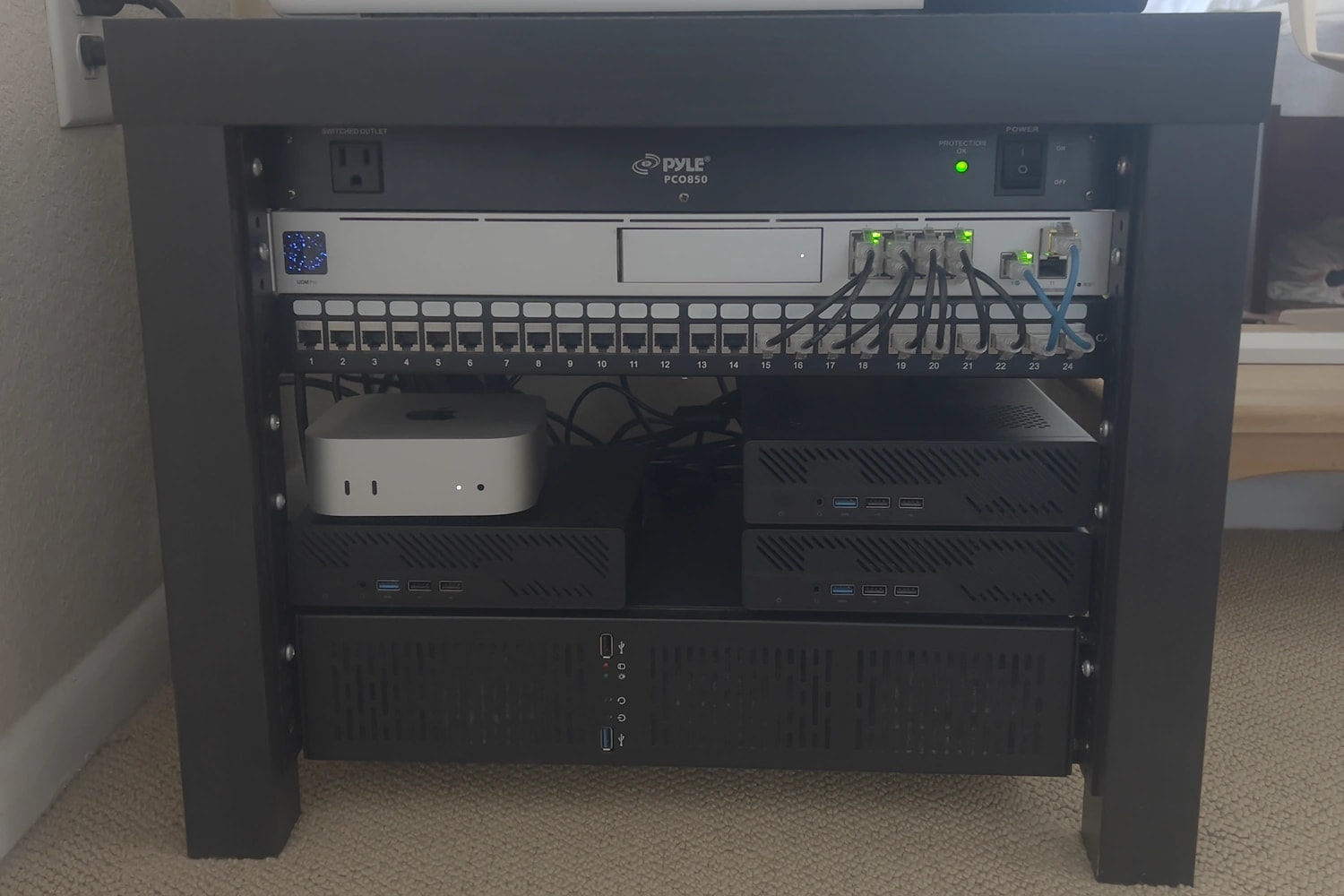
Minisforum MS-01× 3
Proxmox VE hosts — coltrane, davis, monk
- Intel Core i9-13900H
- 64 GB RAM
- Local ZFS pool for VM disks
- 10 GbE SFP+ / 2.5 GbE
Custom NAS
TrueNAS SCALE — built from old PC parts
- Intel Core i7-4770K
- 32 GB RAM
- 2 × 4 TB SSD
- 500 GB SSD boot drive
Apple Mac mini
Self-hosted GitHub Actions runner (in progress)
- Apple M4
- 32 GB RAM
- macOS Tahoe, headless
- Every job in a throwaway macOS VM (Tart), host configured with pyinfra
Ubiquiti UDM Pro
Router / firewall
- VLANs with inter-VLAN firewall rules
- L2-only VLANs for the isolated egress vnets
Motorola MB8611
Cable modem
- DOCSIS 3.1
- In service since 2021
The three MS-01s came up at a good price in early 2025. They are powerful but sip power, which is what you want for something that runs 24/7. They are identical on purpose: same CPU, same iGPU, same PCI addresses, so a VM can move to any node without caring which one it lands on. The NAS is old desktop parts I already had, 2 × 4 TB SSDs and a 500 GB boot drive, running TrueNAS SCALE. I tried TrueNAS CORE first for the "appliance" feel but didn't get along with the FreeBSD side of it.
Everything is headless. Wherever there is a choice I default to Linux and open source.
Platform
The three MS-01s run Proxmox VE 9 as a cluster named after jazz musicians: coltrane, davis and monk. VM disks live on
each node's local ZFS pool; anything bulk or shared lives on the NAS over NFS.
On top of that sits a vanilla Kubernetes cluster (kubeadm, not k3s) on six Debian 13 VMs: a 3-node HA control plane and 3 workers, one of each per Proxmox node, with Cilium as the CNI. This replaces the k3s cluster I built on four Raspberry Pis back in 2022, which is where I first got hooked on running Kubernetes at home.
Not everything goes in the cluster though. The rule I settled on: ingress and identity live on their own VMs, everything else lives in Kubernetes. The reverse proxy and the identity provider are the two things I need working while I fix a broken cluster, so they can't depend on it. Each of those VMs also gets its own SSH key, so compromising one doesn't unlock anything else. There are a couple of other "pets" on VMs for hardware reasons: Emby, because it needs the Intel iGPU passed through for transcoding, and Home Assistant OS, because it is an appliance image that does its own thing.
Provisioning
Two tools with a clear split. Terraform creates everything on Proxmox: it downloads the Debian cloud image to every node, stamps out VMs from it with cloud-init (static IP, SSH key, containerd and kubeadm preinstalled), and defines the SDN networks. One module per concern, composed by a single stack.
Ansible configures what is inside the VMs. Its inventory is dynamic, generated from Terraform's outputs, so IPs and
keys can never drift from what Terraform actually created. One playbook takes freshly provisioned VMs to a Ready cluster
(kubeadm init, join the other control planes one at a time, join the workers, install Cilium) and that is the only
imperative step. A separate role prepares the hypervisors themselves: IOMMU and vfio binding for the iGPU, and making the
bridges VLAN-aware.
Secrets never touch git. Anything Ansible needs is in Ansible Vault; Kubernetes secrets are kept out of the tree entirely.
Deploying applications
Every workload is a plain Kustomize manifest, split into an infrastructure layer (Traefik, metrics-server, storage
drivers, CloudNativePG, the snapshot controller) and an applications layer. A single kubectl apply -k deploys all of
it; the only thing not in there is Cilium, since pods can't schedule until a CNI exists.
CI runs it. A GitHub Actions workflow connects to my LAN over WireGuard, runs terraform plan on every pull request, and on
merge to main runs terraform apply, kubectl apply -k, and the Ansible playbook for the edge proxy. A manual dispatch
can also plan, apply, destroy, or bootstrap the cluster from scratch.
Adding a new app is a Deployment, a Service and an Ingress in a new directory, and a PR.
The Mac mini
The newest machine in the rack, and the one thing in it that isn't Linux. It does two jobs.
macOS CI
GitHub's hosted macOS runners are slow and expensive, so the mini is a self-hosted runner for macOS builds, with a rule: every job runs in a fresh macOS VM that is thrown away afterwards. Nothing a job does survives it, and a job can't see the host, the other lane, or the LAN. This one is public: github.com/diegog/mac-mini-ci.
The host is a headless Mac mini configured with pyinfra, one task per concern, the same way the
Linux side uses Ansible roles. Setting up a Mac for unattended work turned out to be most of the problem: it refuses to run
against the wrong machine or with FileVault on; SSH is key-only and rolled back if sshd rejects the new config; the
machine never sleeps and comes back after a power cut; automatic OS updates are off so it can't reboot itself mid-job;
and a standard ci user is auto-logged-in, because Apple's virtualization framework needs a real GUI session with an
unlocked keychain and there is no supported headless way around that. Homebrew is installed from a hash-pinned package,
and the runner binary is pinned the same way.
The VMs are Tart. Apple allows two at a time, so there are two workers, each a LaunchDaemon, each with one VM slot. A worker keeps a warm VM booted with nothing registered, polls GitHub for queued jobs on its label, claims one (a lock per job id, so the two workers never double-book), mints a single-use just-in-time runner through a GitHub App, and runs the job inside the VM. A watchdog tears down a runner whose job never shows up. When the job finishes the VM is deleted and the next warm one boots.
There are two lanes. mac-build starts immediately on the warm VM. mac-release pays for a fresh VM with the signing
directory mounted read-only inside it; the certificate password is a GitHub environment secret that never lands on the host,
and the environment requires a person to approve each release. Privileges are split the whole way down: the admin account
runs deploys, the ci account runs the workers and cannot escalate, and jobs run in VMs so they can't read the App key
either.
The GitHub side is code too: a Pulumi program manages the repository, its Actions policy (only verified actions, pinned
to a commit SHA), the release environment with its required reviewers, and the branch ruleset for main. It authenticates
as the same GitHub App the runners use, so there is no personal access token anywhere.
The machine is built and both lanes are live, proven by a canary workflow that runs a job through each. Still to come: signing and notarization, which are waiting on a Developer ID certificate, and VM images of my own with Packer — builds use a published Tahoe image for now.
Local models
The same 32 GB of unified memory that makes the mini a good build box also makes it a decent place to run language models, so it does that too. llama.cpp serves the models on the M4's GPU, and LiteLLM sits in front of it as an OpenAI-compatible gateway, so anything that can talk to the OpenAI API can talk to the mini instead. The consumers so far are n8n workflows and some custom workflows I am building. Nothing leaves the network and there is no per-token bill, which changes what you are willing to automate.
This part is installed by hand for now; it moves into the pyinfra deploy next, alongside the CI setup.
Networking
The UDM Pro handles routing, VLANs and the firewall rules between them. I own goge.id and every service gets a subdomain
under it. DNS points those at an "edge" VM running Traefik, which is the only thing exposed to the internet: it terminates
TLS with wildcard certificates from Let's Encrypt (Cloudflare DNS-01 challenge), forces HTTPS, and routes each hostname to
the right place: the in-cluster Traefik for Kubernetes workloads, or straight to the VM for the handful of services outside
it. It also load-balances the Kubernetes API across the three control planes and passes LDAP through to Authentik. Its
backend IPs are generated from Terraform outputs, so adding a worker updates the proxy automatically.
Authentication is Authentik. App UIs sit behind Traefik forward-auth, so I get single sign-on with one set of credentials everywhere, and there is an OIDC/SAML provider and an LDAP outpost for apps that want to bind to a directory. API paths are carved out of the forward-auth so service-to-service traffic (Ombi → Radarr, Radarr → indexers) keeps working with API keys.
The most involved piece is a self-directed exercise in fail-closed egress: two isolated L2 networks, defined as Proxmox SDN vnets so they exist on every node and VMs on them can migrate freely. The only way out of the first one is a gateway VM running WireGuard to a commercial VPN, with an nftables killswitch: if the tunnel drops, traffic blackholes instead of leaking out the LAN. Downstream of that, a second network's only exit is a Whonix gateway, so everything on it goes over Tor. The gateways are explicitly denied any route into the rest of the LAN, so an internet-facing box can't become a foothold. Isolation is enforced at three layers (L2-only VLANs on the UDM with no gateway IP, VLAN-scoped bridges on the hypervisors, and nftables inside the VMs), on the assumption that any one of them can fail.
I tested the failure modes rather than trusting the config: stopping the WireGuard tunnel on the gateway leaves a client on the isolated network with no connectivity at all, not a quiet fallback to the clearnet, and migrating the Tor gateway to a different node while a client stays put keeps Tor working, which is the thing the old single-node bridges couldn't do.
Storage & backups
Three kinds of storage, each for a reason:
- Local ZFS on each Proxmox node for VM disks. Fast, but pinned to the node.
- NFS from the NAS for the big shared data (the media library, app config). Mounted
ReadWriteMany, so the cluster and the Emby VM read the same library. - iSCSI block storage from the NAS, provisioned on demand by the TrueNAS CSI driver, for databases. NFS can't safely give a
database the
fsyncand locking semantics it needs; a ZFS zvol over iSCSI can. Postgres runs on CloudNativePG, MySQL as a plain StatefulSet, both on this class. Volume snapshots are real ZFS snapshots taken on the NAS, which is what CloudNativePG uses for its backups.
Observability
Prometheus scrapes the cluster and, through a small exporter, the Proxmox nodes. Loki collects logs with a 7-day retention. Grafana sits on top of both. The edge proxy writes structured JSON access logs. There is also a small service that ingests the logs from my Vercel projects (including this site) so they land in the same place.
What runs on it
Roughly a third of this is infrastructure, a third is media, and a third is things I self-host instead of paying for: encrypted notes, a Matrix server (with Signal and WhatsApp bridges), workflow automation, and a home automation hub.
Platform







Networking & identity







Storage & data

Observability



Media







Apps & automation






What I've learned
Most of what is in the repo today replaced something I had built by hand first, and the migrations taught me more than the original builds did:
- Raspberry Pi k3s → kubeadm on Proxmox. Proper HA control plane, real storage, and VMs I can rebuild from code instead of SD cards I can't.
- A hand-configured Traefik container → an edge VM defined entirely in Terraform and Ansible. The old one worked, but nobody (including me) knew exactly how. Now the config is in git and the backend IPs can't drift.
- A dedicated VM for Standard Notes → a StatefulSet in the cluster once I had block storage that could safely run a database. It freed the VM and made the rule "apps go in-cluster" actually true.
- Single-node bridges → cluster-wide SDN vnets for the isolated networks, so the gateway VMs can migrate between nodes like everything else.
The habit I have taken to work from all of this: separate the things you need during an outage from the things that can be down during one, and make sure the first group doesn't depend on the second.
What's next
- Finish the macOS CI runner: signing and notarization once the certificate comes through, then my own VM images with Packer.
- Bring the model server under pyinfra with the rest of the Mac mini.
- Retire the last hand-built VMs and move what is left of the old k3s cluster over.